

The Ministry of Defence (MoD) recruitment directorate has officially initiated candidate status notifications via SMS alerts for various advertised positions, including Naib Qasid (BS-01) and other administrative cadres.
Applicants nationwide are receiving status alerts regarding accepted forms, rejection notices, or documentation queries. If you applied for any post within the MoD recruitment drive, monitoring your mobile SMS and online portal status is critical to safeguarding your candidature.
This comprehensive guide outlines the step-by-step procedure to check your online application status, understand the causes behind application rejections, submit an online query/objection before the deadline, and prepare for upcoming screening phases.
Understanding the Ministry of Defence (MoD) SMS Alerts
The MoD recruitment division utilizes automated SMS broadcasts (sender header typically appearing as MoD or official departmental shortcodes) to notify candidates of their preliminary eligibility status.
Types of Messages Received by Applicants
- Acceptance Alerts: Candidates whose documents, fee deposits, and eligibility parameters fully align with the job specifications receive confirmation messages regarding future screening tests or screening roll number slip issuance.
- Query / Rejection Alerts: Candidates whose applications exhibit discrepancies (e.g., age limit mismatch, fee verification failure, incomplete academic entries, or unreadable document uploads) receive conditional rejection alerts.
- Objection Deadline Warnings: Messages sent to rejected candidates explicitly state a strict deadline—such as September 06, 2026—to submit an online representation or query via the candidate portal.
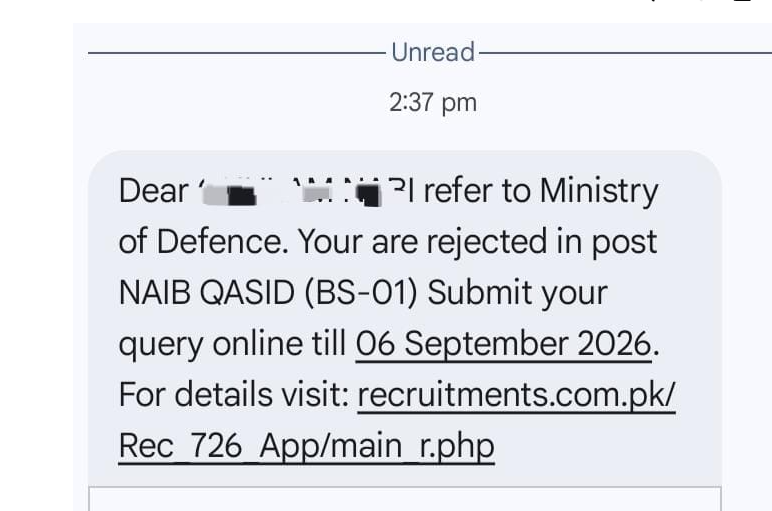
Crucial Action Item: If you received an SMS stating “Your application is rejected,” do not panic. The recruitment directorate provides an online query window allowing candidates to correct mistakes or provide missing documentation before final list consolidation.
Primary Reasons for Application Rejections in MoD Jobs
Understanding why an application was rejected helps candidates formulate a valid online query. Based on standard federal recruitment protocols, primary grounds for rejection include:
| Rejection Ground | Common Cause | Recommended Resolution Strategy |
| Fee Verification Failure | Incorrect Treasury Challan number, bank branch code, or unpaid deposit slip. | Upload a clear scanned copy/photo of the original paid bank receipt. |
| Age Limit Overreach | Exceeding maximum age criteria without claiming valid federal age relaxation. | Submit proof of age relaxation eligibility (e.g., Government Servant status, Armed Forces discharge certificate, or regional quota documents). |
| Academic Mismatch | Unrecognized degree, incomplete result status at closing date, or incorrect division entry. | Provide verified transcripts or equivalence certificates issued by HEC/IBCC. |
| Domicile / Quota Errors | Selecting an incorrect province or district quota not supported by domicile certificates. | Upload a clear, legible scan of the official district domicile certificate. |
| Incomplete Application | Missing photograph, incomplete work history, or blank mandatory fields. | Log into the portal and complete all flagged profile fields. |
Step-by-Step Guide: How to Check Application Status & Submit Online Queries
If you received a rejection alert or wish to verify your profile independently, follow these official portal navigation steps:
Candidate Verification Flow:
1. Visit Portal (recruitments.com.pk) ➔ 2. Enter CNIC & Tracking ID ➔ 3. Review Objection Reason ➔ 4. Upload Proof ➔ 5. Submit Query
Step 1: Access the Candidate Portal
Open your web browser and navigate to the designated official portal URL provided in your SMS notification (such as recruitments.com.pk or the official Ministry portal). Ensure you are connected to a secure internet network.
Step 2: Log Into Your Profile
Enter your 13-digit Computerized National Identity Card (CNIC) number (without dashes) along with your password or application tracking number.
Step 3: Review the “Application Status” Dashboard
Once logged in, locate your applied position (e.g., Naib Qasid BS-01, Assistant BS-15, or UDC BS-13). Check the status column:
- Approved / Provisionally Eligible: No further action required; await test schedule updates.
- Rejected / Query Required: Click on the “View Objection Details” button to read the exact remark issued by the scrutiny committee.
Step 4: Draft and Submit Your Online Query
If you believe your application was rejected erroneously or if you possess the required document:
- Click on “Submit Query / Appeal.”
- Write a clear, concise explanation addressing the specific objection remark.
- Attach clear, legible PDF or JPEG scans of supporting evidence (e.g., Paid Bank Challan, Domicile, CNIC, or Educational Certificates).
- Click “Final Submit” and record your Query Tracking Number for future reference.
Important Warning on Deadlines: Online query portals automatically lock at 11:59 PM on the specified deadline date (e.g., September 06, 2026). Late submissions or physical mail sent to the department are generally not entertained.
Next Steps After Query Submission
Once your query is submitted, the recruitment scrutiny board re-evaluates your submitted evidence against the original job advertisement specifications.
Expected Scrutiny Outcomes:
- Status Revision: If your uploaded proof (e.g., paid challan scan) is validated, your status changes to Provisionally Eligible.
- Roll Number Slip Issuance: Once the query window closes completely, the recruitment portal will release written test screening call letters and physical/skill test roll number slips.
- Final Rejection: If the submitted proof fails to satisfy eligibility criteria, the application remains permanently rejected.
Best Practices for MoD Test Preparation
Candidates whose applications are verified or conditionally cleared should immediately pivot toward test preparation.
- Syllabus Overview: Depending on the post (BS-01 to BS-15), test papers generally comprise Multiple Choice Questions (MCQs) covering General Knowledge, Pakistan Studies, Islamiyat, Basic Mathematics, English Grammar, and Job-Related Technical Questions.
- Physical & Skill Tests: For lower-scale field positions (such as Naib Qasid, Mali, or Chowkidar), candidates may undergo physical screening or basic practical trade tests following initial documentation verifications.
- Verification On Test Day: Always retain your original CNIC, original paid Treasury Challan receipt, and printed Roll Number Slip to secure entry into examination centers.
Transparent Portal Disclaimer
getinfopks.com is an independent educational and career informational portal. This website is NOT affiliated, associated, authorized, endorsed by, or in any way officially connected with the Ministry of Defence (MoD), the Federal Government of Pakistan, or any recruitment testing agency (
recruitments.com.pk). All information provided in this guide is compiled for public educational utility based on official recruitment alerts. For official applications, query submissions, and authoritative notifications, always visit the official government recruitment channels directly.